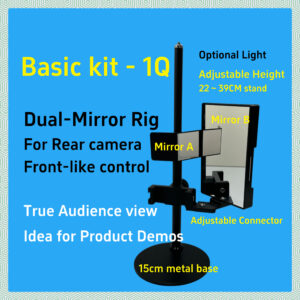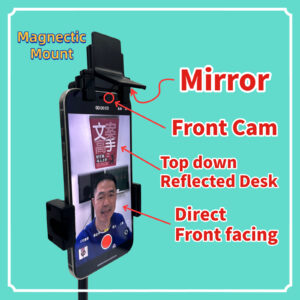
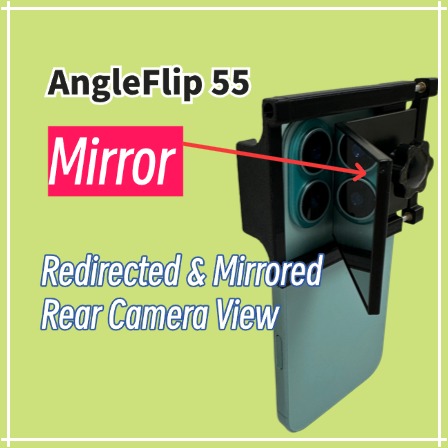
AngleFlip 55 Rear Camera Redirect Mirror
Shifts the rear camera view by 70° and produces a single mirrored reflection.
A compact angled mirror that redirects your rear camera: use it alone for a mirrored rear-camera view, or combine it with a larger mirror to restore correct (non-mirrored) text.
Key Features
-
70° Off-Axis Angle Redirection —
The 55° mirror bends the rear camera’s view by about 70° off its original axis, allowing creators to change the shooting direction without moving the phone itself. -
Single Reflection for a Mirrored View —
A single mirror reflection turns the rear-camera image into a familiar mirrored view while keeping rear-camera sharpness (note that any text in the frame will appear reversed). -
Double Reflection for Correct Text and Wider Coverage —
When used together with a movable larger mirror, the double reflection restores correct (non-mirrored) text and lets the rear camera capture a wider scene area, depending on the size and placement of the large mirror. -
Adjustable Alignment for Different Camera Layouts —
An adjustable sliding-slot mechanism lets you bring the mirror right in front of the phone’s main rear lens, even on multi-camera or off-center camera modules, by fine-tuning both the mirror position and the clamp height so the primary lens sits as close as possible to the mirror. -
Side Clamp That Avoids Volume and Power Buttons —
The side clamp is shaped to grip the phone securely while leaving clearance around the volume and power buttons, so it won’t accidentally press the side keys on most modern smartphones.
Usage Scenarios
-
Mirror-mode rear-camera streaming —
For creators who dislike non-mirrored previews but want rear-camera clarity. AngleFlip 55 provides a mirrored view similar to the front camera, without needing in-app flip options. -
Correct-text streaming with a large mirror —
For streamers who have a movable large mirror and want correct (non-mirrored) background text and a wider scene while still using the rear camera.
Important Notes
-
Mirrored text in single-reflection mode —
In Mirror Mode (AngleFlip 55 alone), the image will be mirrored, and any text in the frame will appear reversed. This mode is best when you don’t need readable on-screen text and have a second phone or device to monitor livestream comments. -
Non-mirrored view in double-reflection mode —
When used together with a larger movable mirror, the two reflections restore correct (non-mirrored) text. This is better for presentations, teaching, or any content where text readability matters, and the streamer may need some time to get used to the non-mirrored audience-perspective view. -
App limitations —
Many livestream apps cannot flip the rear-camera image. AngleFlip 55 is designed to give you both mirrored and non-mirrored options through optical reflections instead of software. -
Setup and alignment —
Double-mirror setups require careful positioning of both the AngleFlip mirror and the larger mirror. For best results, allow time to experiment with angles, distance, and framing.
Setup & Tutorial
For best results, follow the step-by-step guide showing how to align the mirror with your main rear lens, configure Mirror Mode and Double-Mirror Mode, and fine-tune the angles for your specific phone and mirror setup.
Package Contents
- AngleFlip 55 phone clamp with adjustable sliding-slot mechanism
- Angled mirror module with 4×5 cm glass mirror
- M4 mounting screw for the mirror module
- Instruction card with setup diagrams and example layouts
A reference photo of the complete AngleFlip 55 setup will be shown below.